COMPASS

Public resource

Protecting Your Back

Everyday habits for lifting, working, resting and sitting that take load off your back.

A rest position for painful lower back
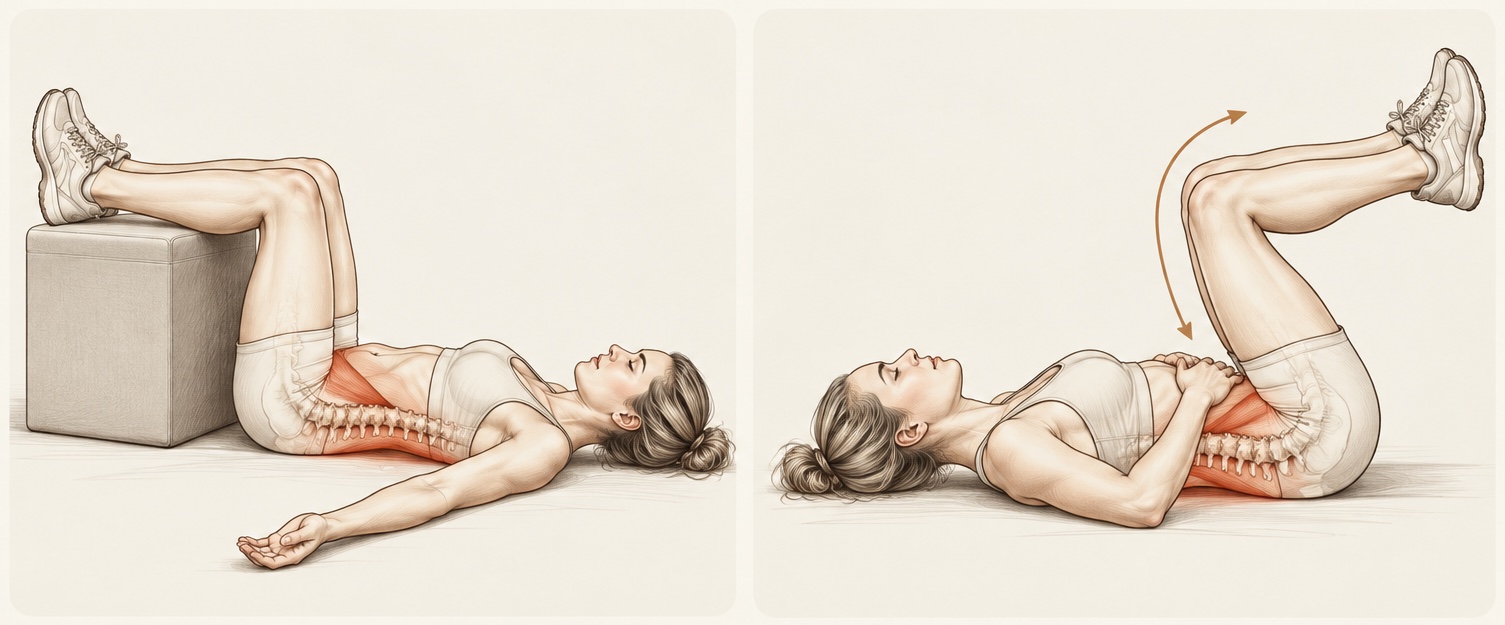
Two drawings of the 90/90 rest position: on the left a person lying on the floor with the calves resting on a box, on the right with the hips and knees bent to 90 degrees and the shins held parallel to the floor

The 90/90 position, also called the astronaut position, is an excellent rest position to try when you are suffering extremely painful lower back pain. Getting into this position decompresses your spine, removing any unwanted load from painful or injured areas so that you can at least catch your breath for a while. Whilst resting here, your body can get to work healing itself.

At home, try this up against your couch:

  1. Lie on the floor.
  2. Bend your hips and knees to 90 degrees so that your legs rest on the seat of the couch.
  3. Stay here for about five minutes.

It is called the astronaut position because this is the position your seat would face inside a spaceship before blast off.

Lifting, carrying and moving

Carrying
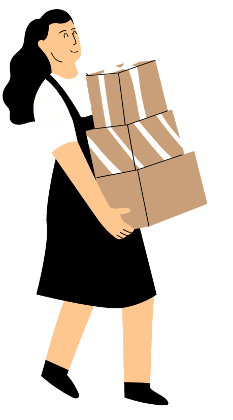
Keep objects you are lifting or carrying close to your body.

  • The farther the object is from your body, the greater the strain.
  • Slide objects close to you, or step toward them, before lifting.

Working
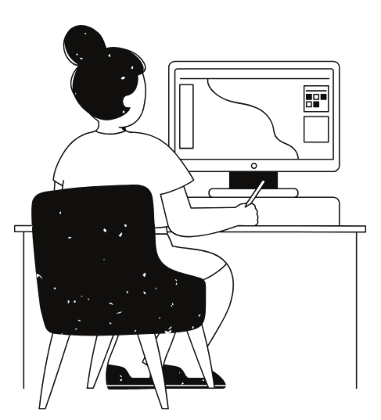
Work with your upper body as close to upright as possible, and minimise twisting.

  • Work with loads between waist and shoulder height; keep loads off the floor where possible.
  • For low-level work, bend your knees, squat or kneel, or consider a longer-handled tool.
  • Move your feet or swivel your chair instead of twisting at the waist or neck, so that what you are handling or looking at is always in front of you.

Neutral spine
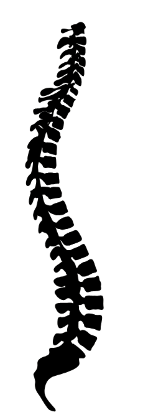
Maintain the natural inward curve of your lower back.

  • This curve tends to flatten when you bend or sit, which increases the strain on your lower back.

Injury prevention

Unexpected movements are more likely to cause injuries than deliberate movements.

  • Keep walking surfaces clear and take care to avoid slips, trips and falls.
  • Make sure objects you are moving do not shift during transport.
  • Proper storage minimises injuries from sudden movements to catch falling objects.

Footrest
Use a footrest for prolonged standing.

  • A footrest about 8 inches (20 cm) high can help you avoid static postures.
  • Vary your standing posture by shifting your weight from both legs to one, then the other.

Organising your work

Take breaks
Frequent short breaks are better than infrequent long breaks.

  • The most important factor in injury risk is not the total time spent on an activity, but how long you do it continuously without interruption.
  • Doing an activity for two hours all at once carries a higher risk of injury than doing the same two hours in shorter segments, alternated with less tiring activities. Strained muscles heal if given time, and the time they need depends on how long they were strained. Once discomfort occurs, muscles take much longer to recover.

Active rest
A rest break doesn’t mean that no work can be done.

  • Switch to a task that puts less strain on that muscle group.
  • Alternate sitting and standing tasks, or do some stretches.
  • Alternate tasks that involve a lot of bending with tasks that use more upright postures.
  • Use different muscle groups for the task (for example, your right hand instead of your left).
  • When standing in one spot for long periods, vary your posture by placing one foot on a footrest.

Extra care

Take extra care and warm up at high-risk times.

  • After a day off, first thing in the morning or after waking, after breaks, or after long periods of inactivity.
  • After sitting or driving — the combination of sitting and vibration is especially hard on the back.

Computer and desk ergonomics

Chair
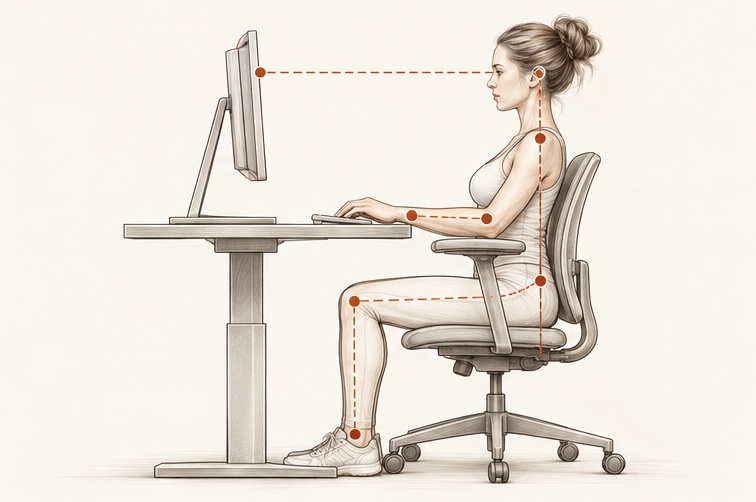
Side view of a person seated at a desk with the back supported, thighs level, feet flat and the forearms level with the keyboard
  • Your chair should let you sit straight, with your arms relaxed at your sides and your hands and wrists at a 90° angle to your keyboard or desktop (the chair should have short, adjustable armrests).
  • Set the height of your chair so your thighs are horizontal to the floor and your feet rest flat. If your feet don’t reach the floor, use a footrest.
  • There should be enough lumbar support to keep your back straight, with a slight lean of approximately 100°.

Keyboard and mouse
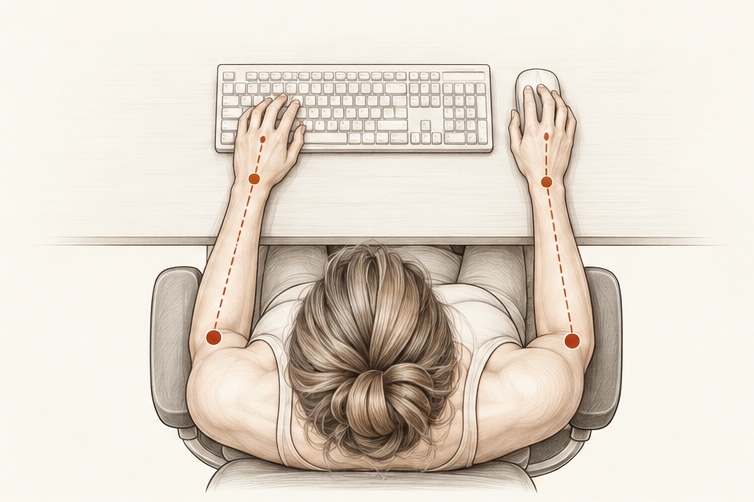
Top view of a person at a desk with the elbows bent and the forearms resting level, the hands on the keyboard and the mouse
  • Keep your shoulders relaxed, your arms horizontal in front of you, and the mouse within easy reach.
  • Keep your wrists straight and flat, not bent up or down.
  • Your keyboard should be fairly flat, or on a negative slant.
  • Consider a keyboard tray to help keep your hands and arms in a neutral position.
  • Use a light touch on the keys; try not to pound, even with a deadline just moments away.
  • Keep your mouse as close to your keyboard as possible.

Monitor and workstation
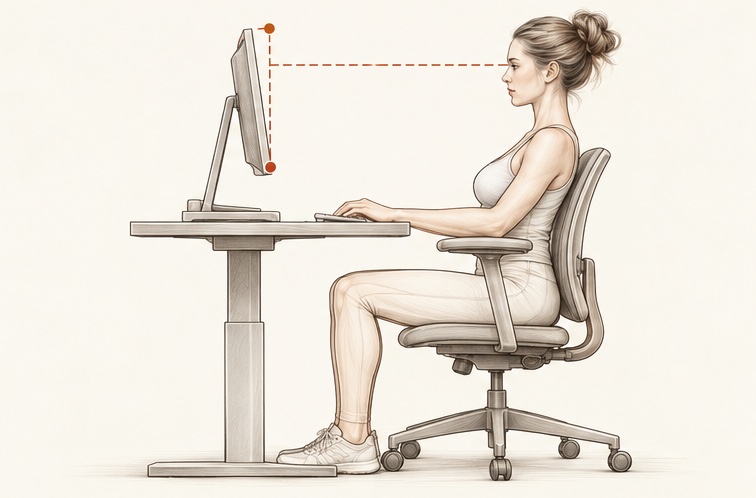
Side view of a person seated at a desk with the eyes level with the top of the monitor, about an arm’s length from the screen
  • Position your workstation to avoid glare from windows or overhead lighting.
  • Your monitor should be perpendicular to any window.
  • Line up your eyes with the upper third of the screen, about 55 to 65 cm (22–26 inches), or an arm’s length, away.
  • Adjust the brightness of your screen to your comfort level on a regular basis.
  • Keep ambient lighting low and add task lighting as needed.
  • Keep your screen and eyeglasses clean.

Telephone and gadgets
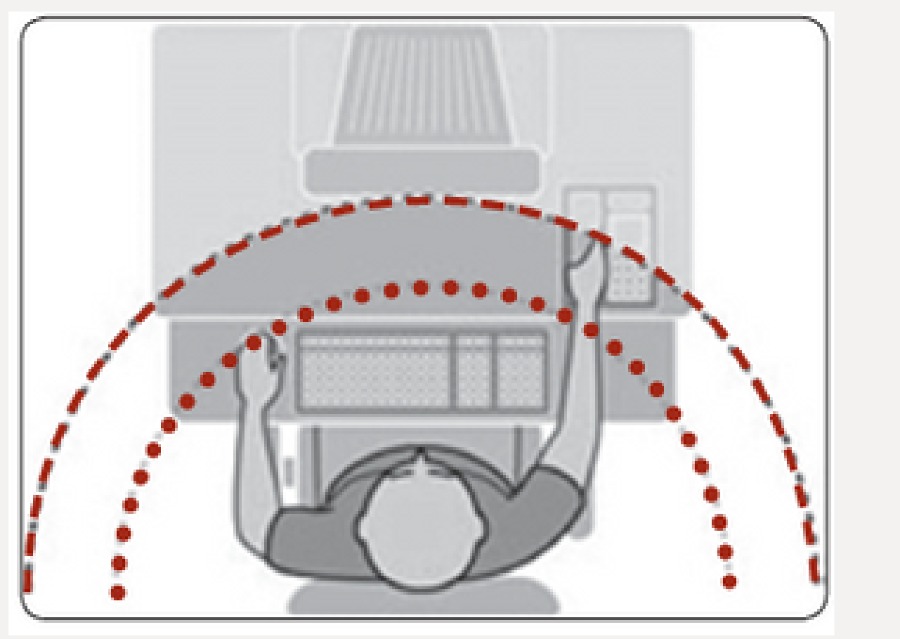
Top view of a desk showing the phone and gadgets kept within easy arm’s reach in a curved zone around the person
  • Keep your phone and any other gadget you use regularly (calculator, stapler) within 25 cm (10 inches) of you.
  • Don’t cradle your phone on your shoulder while using the computer. When multi-tasking, hold the phone in one hand and the mouse in the other, or use a headset or speakerphone.
  • If you refer to documents as you work on the computer, use a document holder set close to the monitor.

Laptops and road trips

  • If you are carrying more than 10 pounds (about 4.5 kg), use a wheeled carrying case or a backpack with padded straps.
  • Try to get a bulkhead or exit row seat (more room) so you are more comfortable working on your laptop.
  • Avoid screen reflection by lowering the window shade and overhead light.
  • Adjust your chair height and laptop in your hotel room or conference room. Your arms should stay at a 90° angle to your laptop.
  • Use a phone book or briefcase as a footrest, and avoid positions that strain your neck.

Get up, walk around and take regular breaks — every 45 minutes at most.

Source

The 90/90 position is adapted from the practice’s patient handout.

  1. The Physical Therapy Centre — neck and back exercises

General educational information from the practice — not personalised advice or a prescription. If anything is painful, stop. Book an appointment for guidance specific to you.

Ask Compass

Public resource

Protecting Your Back

Everyday habits for lifting, working, resting and sitting that take load off your back.

A rest position for painful lower back

Two drawings of the 90/90 rest position: on the left a person lying on the floor with the calves resting on a box, on the right with the hips and knees bent to 90 degrees and the shins held parallel to the floor

The 90/90 position, also called the astronaut position, is an excellent rest position to try when you are suffering extremely painful lower back pain. Getting into this position decompresses your spine, removing any unwanted load from painful or injured areas so that you can at least catch your breath for a while. Whilst resting here, your body can get to work healing itself.

At home, try this up against your couch:

  1. Lie on the floor.
  2. Bend your hips and knees to 90 degrees so that your legs rest on the seat of the couch.
  3. Stay here for about five minutes.

It is called the astronaut position because this is the position your seat would face inside a spaceship before blast off.

Lifting, carrying and moving

Carrying

Keep objects you are lifting or carrying close to your body.

  • The farther the object is from your body, the greater the strain.
  • Slide objects close to you, or step toward them, before lifting.

Working

Work with your upper body as close to upright as possible, and minimise twisting.

  • Work with loads between waist and shoulder height; keep loads off the floor where possible.
  • For low-level work, bend your knees, squat or kneel, or consider a longer-handled tool.
  • Move your feet or swivel your chair instead of twisting at the waist or neck, so that what you are handling or looking at is always in front of you.

Neutral spine

Maintain the natural inward curve of your lower back.

  • This curve tends to flatten when you bend or sit, which increases the strain on your lower back.

Injury prevention

Unexpected movements are more likely to cause injuries than deliberate movements.

  • Keep walking surfaces clear and take care to avoid slips, trips and falls.
  • Make sure objects you are moving do not shift during transport.
  • Proper storage minimises injuries from sudden movements to catch falling objects.

Footrest

Use a footrest for prolonged standing.

  • A footrest about 8 inches (20 cm) high can help you avoid static postures.
  • Vary your standing posture by shifting your weight from both legs to one, then the other.

Organising your work

Take breaks

Frequent short breaks are better than infrequent long breaks.

  • The most important factor in injury risk is not the total time spent on an activity, but how long you do it continuously without interruption.
  • Doing an activity for two hours all at once carries a higher risk of injury than doing the same two hours in shorter segments, alternated with less tiring activities. Strained muscles heal if given time, and the time they need depends on how long they were strained. Once discomfort occurs, muscles take much longer to recover.

Active rest

A rest break doesn’t mean that no work can be done.

  • Switch to a task that puts less strain on that muscle group.
  • Alternate sitting and standing tasks, or do some stretches.
  • Alternate tasks that involve a lot of bending with tasks that use more upright postures.
  • Use different muscle groups for the task (for example, your right hand instead of your left).
  • When standing in one spot for long periods, vary your posture by placing one foot on a footrest.

Extra care

Take extra care and warm up at high-risk times.

  • After a day off, first thing in the morning or after waking, after breaks, or after long periods of inactivity.
  • After sitting or driving — the combination of sitting and vibration is especially hard on the back.

Computer and desk ergonomics

Chair

Side view of a person seated at a desk with the back supported, thighs level, feet flat and the forearms level with the keyboard
  • Your chair should let you sit straight, with your arms relaxed at your sides and your hands and wrists at a 90° angle to your keyboard or desktop (the chair should have short, adjustable armrests).
  • Set the height of your chair so your thighs are horizontal to the floor and your feet rest flat. If your feet don’t reach the floor, use a footrest.
  • There should be enough lumbar support to keep your back straight, with a slight lean of approximately 100°.

Keyboard and mouse

Top view of a person at a desk with the elbows bent and the forearms resting level, the hands on the keyboard and the mouse
  • Keep your shoulders relaxed, your arms horizontal in front of you, and the mouse within easy reach.
  • Keep your wrists straight and flat, not bent up or down.
  • Your keyboard should be fairly flat, or on a negative slant.
  • Consider a keyboard tray to help keep your hands and arms in a neutral position.
  • Use a light touch on the keys; try not to pound, even with a deadline just moments away.
  • Keep your mouse as close to your keyboard as possible.

Monitor and workstation

Side view of a person seated at a desk with the eyes level with the top of the monitor, about an arm’s length from the screen
  • Position your workstation to avoid glare from windows or overhead lighting.
  • Your monitor should be perpendicular to any window.
  • Line up your eyes with the upper third of the screen, about 55 to 65 cm (22–26 inches), or an arm’s length, away.
  • Adjust the brightness of your screen to your comfort level on a regular basis.
  • Keep ambient lighting low and add task lighting as needed.
  • Keep your screen and eyeglasses clean.

Telephone and gadgets

Top view of a desk showing the phone and gadgets kept within easy arm’s reach in a curved zone around the person
  • Keep your phone and any other gadget you use regularly (calculator, stapler) within 25 cm (10 inches) of you.
  • Don’t cradle your phone on your shoulder while using the computer. When multi-tasking, hold the phone in one hand and the mouse in the other, or use a headset or speakerphone.
  • If you refer to documents as you work on the computer, use a document holder set close to the monitor.

Laptops and road trips

  • If you are carrying more than 10 pounds (about 4.5 kg), use a wheeled carrying case or a backpack with padded straps.
  • Try to get a bulkhead or exit row seat (more room) so you are more comfortable working on your laptop.
  • Avoid screen reflection by lowering the window shade and overhead light.
  • Adjust your chair height and laptop in your hotel room or conference room. Your arms should stay at a 90° angle to your laptop.
  • Use a phone book or briefcase as a footrest, and avoid positions that strain your neck.

Get up, walk around and take regular breaks — every 45 minutes at most.

Source

The 90/90 position is adapted from the practice’s patient handout.

  1. The Physical Therapy Centre — neck and back exercises

General educational information from the practice — not personalised advice or a prescription. If anything is painful, stop. Book an appointment for guidance specific to you.